How ShapeDiver replaced a manual, expert-heavy manufacturing process with a scalable, no-code workflow built on C#, Grasshopper, and a cloud interface.
What kind of walls are we automating?
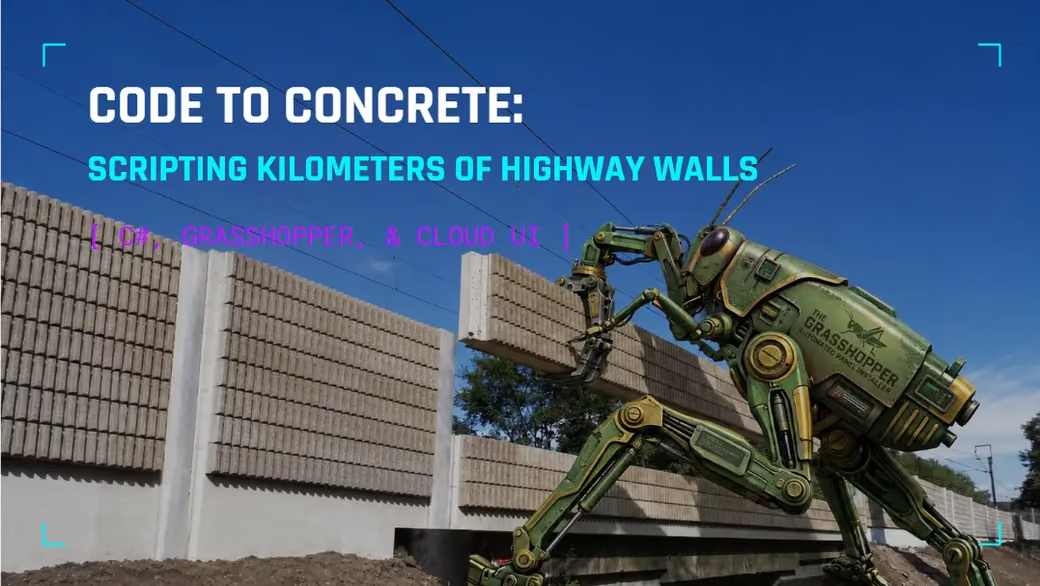
You’ve probably seen these walls if you’ve driven on a highway in Europe. They can run for kilometers and are used to block the noise that cars or trains emit to nearby towns. Additionally, they are used to prevent driver fatigue and microsleep by adding breaking patterns, or opening a view onto the landscape now and then, helping keep drivers alert. As a result, the concrete panels that create these walls do not only have to follow the kilometers of changing landscape, but also design and manufacturing rules, for which an automated parametric approach is a great fit.
Noise-cancellation wall with a design pattern.
What is the challenge?
Before this project, the manufacturer engineered these walls by hand: manual PDFs, spreadsheets, CAD drawings, all requiring specialized experts who could interpret the complex geometry. While this approach works at a reasonable scale, it became a bottleneck over time as the product was being deployed from Austria to all over Europe.
You need to consider that these panels are not only rectangles but also parallelograms and trapezoids of various sizes and angles, all of which must be individually planned to ensure manufacturability and precise installation. Can you imagine the difficulty of manually tracking hundreds of concrete panels, each with unique shapes and properties? Or needing an army of experts to draft construction details for every single one?
What was our solution?
We implemented a hybrid architecture that balances automation with flexibility, structured into three distinct layers:
- Develop the underlying logic and parametric geometry within a core C# plugin.
- Orchestrate core logic and manage data I/O through a Grasshopper definition.
- Provide a web-based online application powered by ShapeDiver, enabling engineers and designers to interact with the tool without writing code.
This solution was proposed back in 2018, and to this day, new extensions keep getting added. It’s a good example of how these tools tend to grow over years as living systems rather than reaching a completion stage.
Understanding the Wall
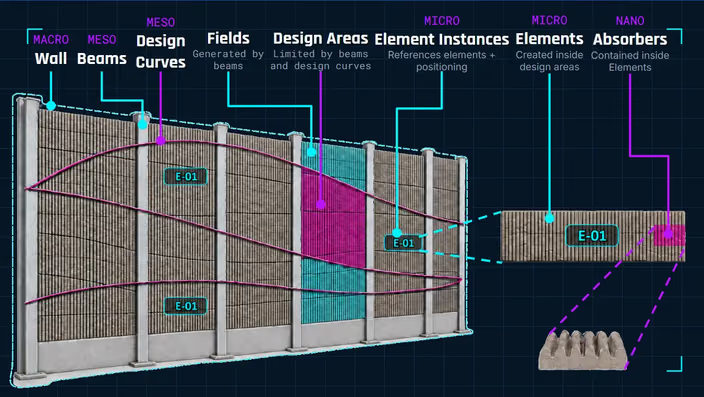
Any core algorithm must begin by defining domain concepts and their relationships to serve as a foundation for construction and editing methods. Without well defined domain logic, feature development introduces overhead, redundancy, and maintainability issues.
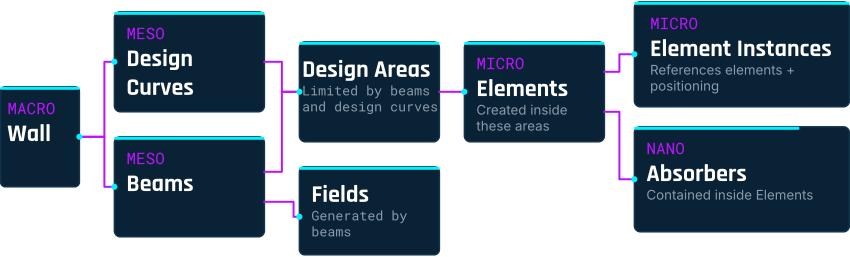
To establish a robust data model, we established a conceptual hierarchy that mirrors the physical structure of the wall:
- Wall — The complete physical structure.
- Beams — Structural delimitations along the wall.
- Fields — A field is delimited by two beams.
- Design Curves — Curves that either follow the landscape or exist just to break up the pattern and help with microsleep.
- Design Areas — Areas delimited by design curves and beams.
- Elements — The actual concrete pieces, optimized within each design area to respect construction constraints, so they can actually be manufactured.
- Element instances — Once elements are generated, the system checks the wall again for identical elements, so manufacturing can be optimized for repeats.
- Absorbers — The smallest scale: the sound-absorbing pieces placed inside each concrete element. These need their own optimization pass too, mainly to avoid small leftover offcuts and reduce waste.
Why C#: Avoiding the “Spaghetti Monster”
Instead of keeping everything in one huge Grasshopper file, the core logic was extracted into a C# plugin. Why? When a Grasshopper script gets too big and tangled, pulling the logic out into a plugin is usually the better long-term move. Grasshopper excels at visual execution flow and parameter orchestration, but text based algorithms benefit from modern version control, unit testing, and execution performance provided by standard software development practices.
We chose this path although finding a computational designer comfortable with C# was challenging back in 2018. Today, however, that is far less of an issue, and LLMs have streamlined the process of writing and maintaining such code, though a deep understanding of the underlying logic remains essential.
Orchestration: Inputs and Outputs in Grasshopper
Above the plugin layer, the Grasshopper definition is here to manage the inputs and outputs around the C# core.
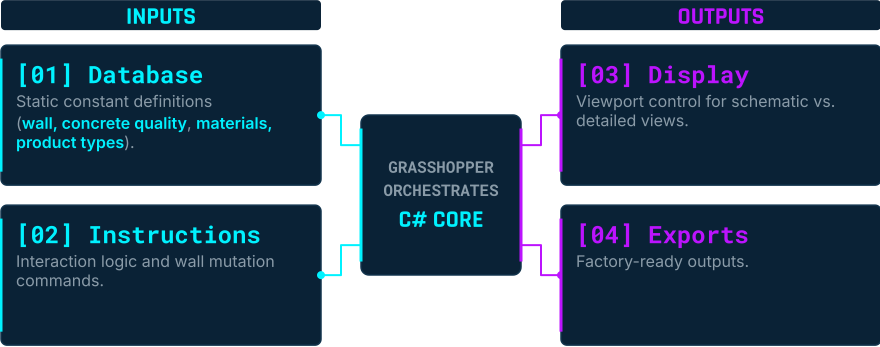
On the input side, there’s a database of JSON files with the wall’s data, concrete qualities, materials, product types, instructions for editing the wall, and so on. This JSON-based setup dates back to 2018, when JSON support in Grasshopper was still unusual. The ShapeDiver plugin was the first one to define how to read and build JSON files in Grasshopper.
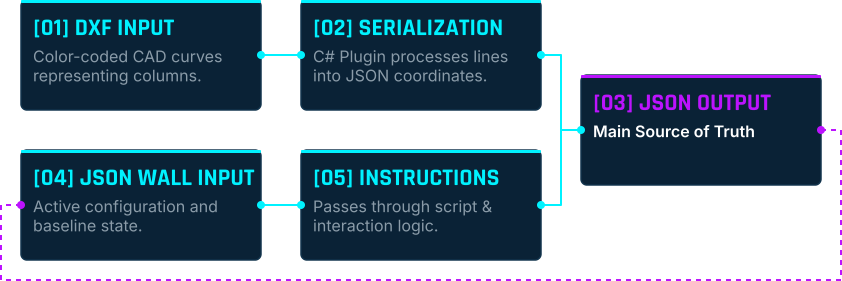
Additionally, the designer and engineer provide a DXF file with curves representing beams and design curves. These get serialized into a JSON format, sent back into Grasshopper, and from there instructions can keep modifying that JSON. The result is basically an ongoing loop where the wall JSON is the source of truth, instructions update it, and the cycle repeats as needed.
On the output side, you get a visual display of the wall plus everything that goes out to manufacturing.
The Cloud Application
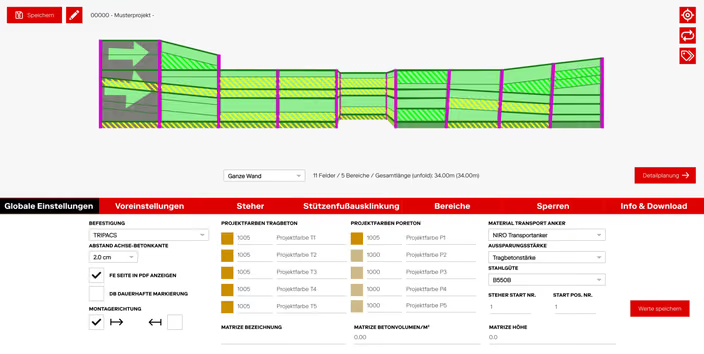
The last piece solves a simple problem: engineers and designers need to use this without writing JSON by hand or opening Grasshopper. ShapeDiver’s browser based interface hides all of that behind a normal, no-code experience, while still sending the same JSON instructions underneath: locking a field, moving a design curve, changing a beam, joining concrete elements, and so on.
In practice, the user experience looks like this:
- Upload the DXF file with the wall’s beams and design curves.
- Generate the wall — ShapeDiver computes the wall JSON and shows a visual model.
- Interactive updates — Click into a design area to change things like color or how the elements are oriented (aligned to the top or bottom, for example), and see the layout update. Pick specific fields, connect elements, or add cutouts (for example, gaps for animals to pass through).
- Export results for manufacturing.
Settings don’t get lost between sessions either. The system saves full model states, so a specific wall configuration can be reloaded later instead of set up from scratch each time.
Which exports are available?
The main automation benefit is the hundreds of exports that can be obtained from the algorithm, including:
- An overview CAD drawing of the full wall with all elements and absorbers placed.
- A master spreadsheet listing every element and the data needed for manufacturing.
- A PXML to transfer configured element geometries, article numbers, and component bills of materials from the configurator directly to the ERP system to automate manufacturing and sequence production for shipping.
- A laser-projection CAD file for every single element, used on the shop floor to place absorbers.
- A detailed PDF blueprint for every single element, potentially hundreds per wall. These get exported through a script that calls ShapeDiver’s backend repeatedly until every file is generated. One example wall needed 180 PDFs!
On the Shop Floor
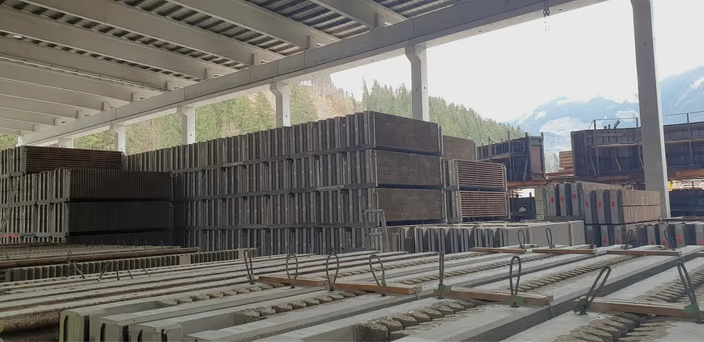
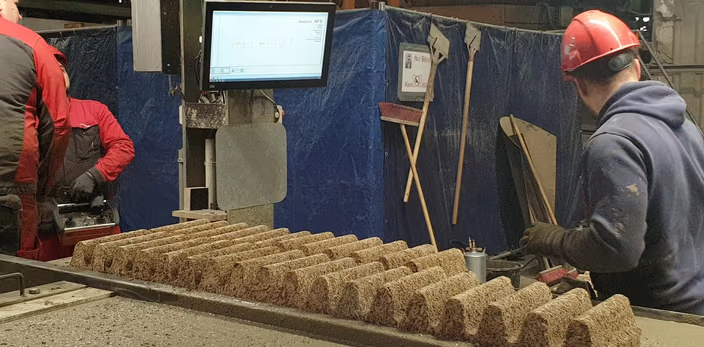
The gap between the design side and the shop floor is worth noting. The planning and editing work is fully digital, but production is still mostly manual. Workers look at screens showing the PDF for whichever concrete element they’re currently building, so they always have that as their reference. The most advanced piece of equipment in use is a ceiling-mounted laser that projects, at real scale, where each absorber should go.
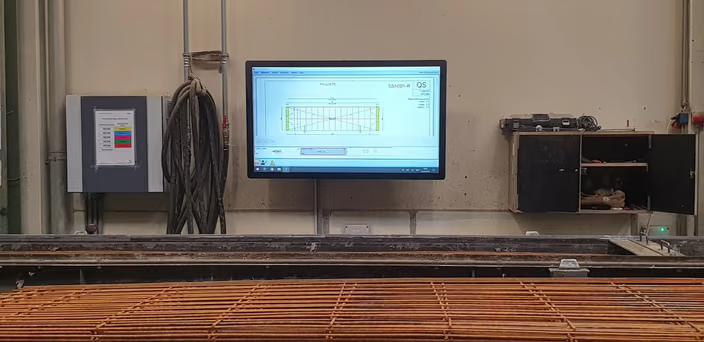
The data needed to go further (CAM output for automated or robotic manufacturing) is already there, and it’s been used on other projects. For this one, the limit isn’t the software, it’s the machinery on site. If that changes, extending into more automated manufacturing would be a fairly natural next step.
Closing Thoughts
This project is a good example of what a computational design system looks like a few years into real production use: not one big script, but a layered setup with a C# core, a Grasshopper orchestration layer, and a cloud interface, built so people without a computational design background can safely work with complex geometry at scale. It replaced a process that depended on hard-to-find expertise with something engineers and designers can run themselves, while still leaving a clear path toward more automation whenever the manufacturing side is ready for it.
Check the Presentation
Watch Edwin Hernandez Gomez, lead computation designer at ShapeDiver, introduce the project and discuss in details the challenges of the project and the technical solutions our team built to solve them.
Code to Concrete: Scripting Kilometers of Highway Walls
Misfits of Manufacturing 2026
Many thanks to the team at the Misfits of Manufacturing event for giving Edwin the opportunity to present those insights to the computational design community!
Are you looking to digitalize and automate complex manufacturing processes such as the one in this case study? Contact us and let’s discuss your projects!
Professional services
ShapeDiver’s own team built this workflow, from the Grasshopper and C# logic to the cloud interface. We can build yours too, then hand it over for you to own.